Month: August 2022

  • My elif conditional branching isn’t working!! [Python]

    My elif conditional branching isn’t working!! [Python]

    Have you ever wanted to branch on multiple conditions with an if statement, tried using elif, and found that although no error was raised the results still weren’t right?
    If so, the situation described below might be what’s happening.
    I made this mistake myself, so I’m writing it down here for reference.

    The problematic program

    The problem arises when you write two conditions in the if and elif statements of a program that includes elif.

    def trable(a, b):
        if a >= 10 & b >= 10:
            print("patern A")
        elif a >= 10 & b < 10:
            print("patern B")
        elif a < 10 & b >= 10:
            print("patern C")
        else:
            print("patern D")
    
    trable(11, 11)
    trable(11, 9)
    trable(9, 11)
    trable(9, 9)

    When you run the program above, you might expect the cases to be sorted into patterns A, B, C, and D in order from the top, but what you actually get is the output below.

    patern A
    patern B
    patern C
    patern B

    So what happens if we swap the order?

    def trable(a, b):
        if a >= 10 & b >= 10:
            print("patern A")
        elif a < 10 & b < 10:
            print("patern B")
        elif a >= 10 & b >= 10:
            print("patern C")
        else:
            print("patern D")
    
    trable(11, 11)
    trable(9, 11)
    trable(11, 9)
    trable(9, 9)

    If you swap the code for patterns B and C, expecting the output to come out as A, B, C, D, what you actually get is the output below.

    patern A
    patern D
    patern D
    patern D

    elif itself is used as follows when you want to define multiple conditions.

    if 条件式A:
      条件式Aが真(True)となった場合の処理
    elif 条件式B:
      条件式Aが偽(False)で、条件式Bが真(True)となった場合の処理
    else:
      条件式Aが偽(False)で、条件式Bも偽(False)となった場合の処理

    However, once the conditional expressions in the if and elif statements contain two conditions, the problem described above is likely to occur.
    As a result, you don’t get the output you intended.

    The tricky part is that no error is raised, so you can’t tell whether things are working until you actually look at the results.

    How to fix it

    When you want to branch into multiple cases using compound conditions, avoid specifying multiple conditions in the elif statement.

    def resolve(a, b):
        if a>= 10:
            if b >= 10:
                print("patern A")
            else:
                print("patern B")
    
        else:
            if b >= 10:
                print("patern C")
            else:
                print("patern D")
    
    resolve(11, 11)
    resolve(11, 9)
    resolve(9, 11)
    resolve(9, 9)

    It’s more cumbersome, but doing it this way gives you exactly the output you expect.

    Programming has unexpected pitfalls like this, so it’s a good lesson in carefully checking the code you write.

    Addendum (August 2022)

    It turns out the problem was that I hadn’t wrapped the conditions in parentheses.

    def trable(a, b):
        if (a >= 10) & (b >= 10):
            print("patern A")
        elif (a < 10) & (b < 10):
            print("patern B")
        elif (a >= 10) & (b >= 10):
            print("patern C")
        else:
            print("patern D")

    With this change, the branching worked correctly.
    Alternatively, you can also fix it by writing and instead of &.

    def trable(a, b):
        if a >= 10 and b >= 10:
            print("patern A")
        elif a < 10 and b < 10:
            print("patern B")
        elif a >= 10 and b >= 10:
            print("patern C")
        else:
            print("patern D")

    & and and may seem equivalent, but & also acts as a bitwise AND, so in the original program

    a >= 10 & b < 10

    this apparently means a >= (10 & b) < 10, and
    with a=9, b=9 the inequality becomes
    9>=8<10, which evaluates to True.

    Tricky stuff…

  • Earn Miles Just by Getting Around! A Rewarding App with No Annoying Ads

    Earn Miles Just by Getting Around! A Rewarding App with No Annoying Ads

    Apps that let you earn points or miles just by getting around have become popular in recent years.
    The trouble is, many of them make you open the app and watch an ad every single time you move, or they simply bombard you with ads. It gets so irritating that you start to wonder whether you’re collecting points or just collecting frustration.

    Recently I came across two apps featured in a magazine that are remarkably convenient: none of the tiresome ads I’d come to expect, and you can actually enjoy racking up miles.

    Official sites ↓
    Miles
    ANA Pocket

    They made quite an impression on me, so I thought I’d write up a blog post about them.

    About the two apps

    The two apps use almost the same system, and you can run both at once, so I’d recommend using them together.

    With both apps, you accumulate miles as you travel, and those miles can be exchanged for points or goods.
    Note that neither offers a cash-back option.

    The rate at which you earn miles depends on your mode of transport, with walking earning more per unit distance than driving.

    Your mode of transport is classified automatically, and if it gets it wrong you can request a manual correction.

    You can also view your travel history, so you can check how far you moved on any given day.

    In my experience, both apps track movement quite accurately—they properly register even a quick trip from home to the convenience store, and you earn miles for it!

    The one drawback is that your phone’s battery drains unusually fast.
    Well, of course it does—they’re using location services continuously.
    That’s just something you have to live with.

    About Miles

    Miles is an app made by Miles Japan Inc., and as the original app of the two, it’s very solidly built.
    The actual screen looks like the one below: beyond your earned miles, it shows travel data and lets you view detailed trips in your history, which makes it handy for getting a rough picture of your health and daily activity.

    The miles you accumulate can be exchanged for all sorts of things—JAL miles, campaign entries, convenience store coffee, and more.

    There’s nothing you have to do on a daily basis, so you can just leave it installed and check in whenever you feel like it. That’s a nice difference from ANA Pocket.

    Invitation campaign code
    (Install the app using the code below and you’ll get 100 yen in Amazon gift credit!)

    https://miles.app/jp/NVPRMO

    Invitation code: NVPRMO

    About ANA Pocket

    ANA Pocket is ANA’s app, which runs on the Miles system.
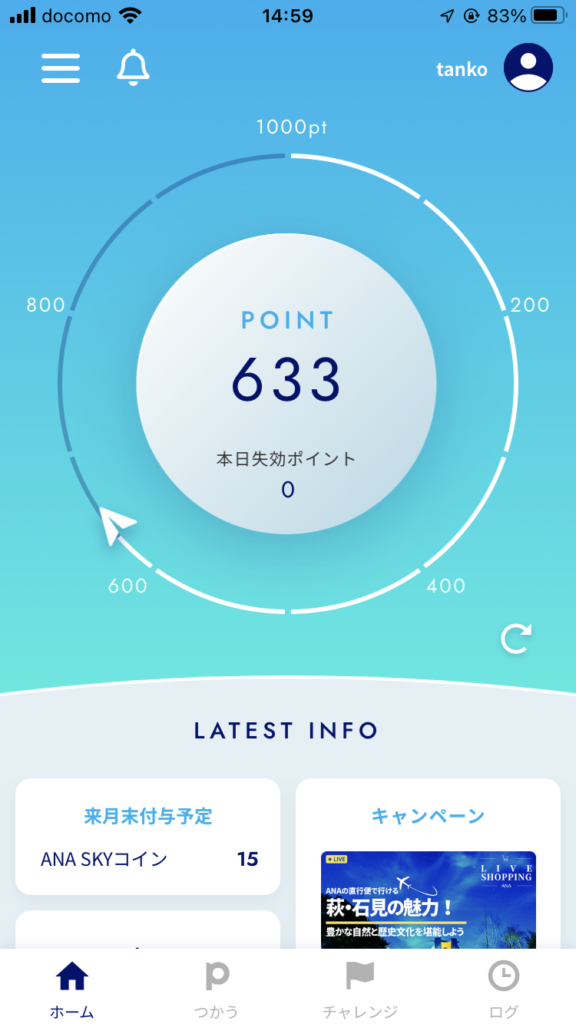
    As you’d expect from a major company, the home screen is extremely easy to read.

    Here you accumulate points instead of miles.
    ANA Pocket has a “Challenges” system: you sign up for a challenge, and if you meet its conditions you earn bonus points.

    The best thing about ANA Pocket is that you can convert your points into ANA miles, and there’s also a gacha you can spend points on, so you’re never at a loss for how to use them.

    Converting to ANA miles always feels like good value, so if there’s nothing else you want, that’s a perfectly fine default.

    Like Miles, it also lets you view your travel history, so you can review your activity in the same way.

    The biggest sticking point is probably that it isn’t available on Android…
    Here’s hoping that changes.

    Invitation campaign code
    (Install the app using the code below and you’ll get 5,000 pt!)

    https://anapocket.page.link/WHQSjXJZqekVaqwr7