Month: May 2021

  • What is the IT Passport Examination? How long does it take to study? What is it good for?

    What is the IT Passport Examination? How long does it take to study? What is it good for?

    I recently took the IT Passport Examination.
    The IT Passport Examination has been gaining recognition lately, but what kind of certification is it, and how difficult is it?
    I’ll explain based on my own experience.

    First, to summarize:
    The IT Passport Examination is a proficiency test covering knowledge of IT.
    Study time is roughly 30 hours. Even at the very least, you’ll need more than 10 hours!

    To begin with, the IT Passport is a national certification, and it is a credential showing that you have basic knowledge of IT and business management in general.

    So it isn’t a license; to me it felt closer to a proficiency test.
    The content, too, is less about programming and more about IT technology plus general knowledge related to corporate strategy and management.

    The benefits of earning this certification include:
    ・It gives you a selling point in your job search
    ・It serves as proof that you have IT knowledge

    The people I’d recommend it to are mainly university students and new employees.
    If you’re feeling uneasy about job hunting, why not give this certification a try?

    Next, about the exam itself.
    Having taken it, I felt the difficulty was about the same as when I got my Class 4 amateur radio license.
    Frankly speaking, it was harder than I expected.

    I think about 30 hours of study will reliably get you a pass.
    In my case it was around 8 hours, and it felt like a squeaked-by pass.

    The content is relatively easy to grasp and many of the topics are familiar, but the actual terminology is very hard to memorize—there are tons of three-letter acronyms and complicated terms.

    As for the fastest way to pass, the key point is that you must not try to get a perfect score.
    Aim for just a bit above the passing score of 600 (out of 1000).

    The reason is that the exam will definitely include questions on things you haven’t studied.
    There are also plenty of questions that are hard to understand.

    Past exams are published on the official website, so if you work through the last few years’ worth you’ll see what I mean—there’s a surprising amount of “I never studied this!” and “This is way too hard!”

    When you hit a question you don’t understand, many people want to fully understand it or be able to solve it, but if you want to pass in the shortest time, just accept that it is what it is and move on.

    The acronyms are hard to remember too, but rather than memorizing every term perfectly like a dictionary, narrow it down to keywords and aim for a rough, general grasp.

    Some might question whether that’s good enough for a certification, but personally I don’t think you need to memorize terms like a dictionary at all.
    What matters is that when you actually encounter the term, you have a rough sense of what it means and know that such a concept exists.

    Learn it roughly! That’s the fastest route to passing.

    Here’s the study method I’d recommend:

    • Read a study guide once from start to finish (read to the end even if you don’t understand it)
    • Work through past exams from about four years ago up to the present
    • Use the study guide to understand the questions you got wrong or didn’t understand (if it’s not in the guide, let it go)
    • Note down the terms you often got wrong along with their meanings, and reread them right before the exam

    The way to beat this exam is to work through past papers!
    That’s all there is to it.

    It isn’t a highly difficult certification.
    If you prepare properly, you can definitely pass.

    Give it a try!

    The IT Passport website is here
    And here’s the book I used to study
  • Arithmetic Operations in Bonsai

    Arithmetic Operations in Bonsai

    Bonsai is widely used for designing experiments in neuroscience and beyond.
    With Bonsai you can build sophisticated programs without writing code, and run them with precise synchronization.

    Because it is so simple, however, operations that would be trivial in ordinary programming—such as basic arithmetic—have to be done in a somewhat unintuitive way.
    Here I explain how to perform arithmetic operations, using MouseMove as an example.

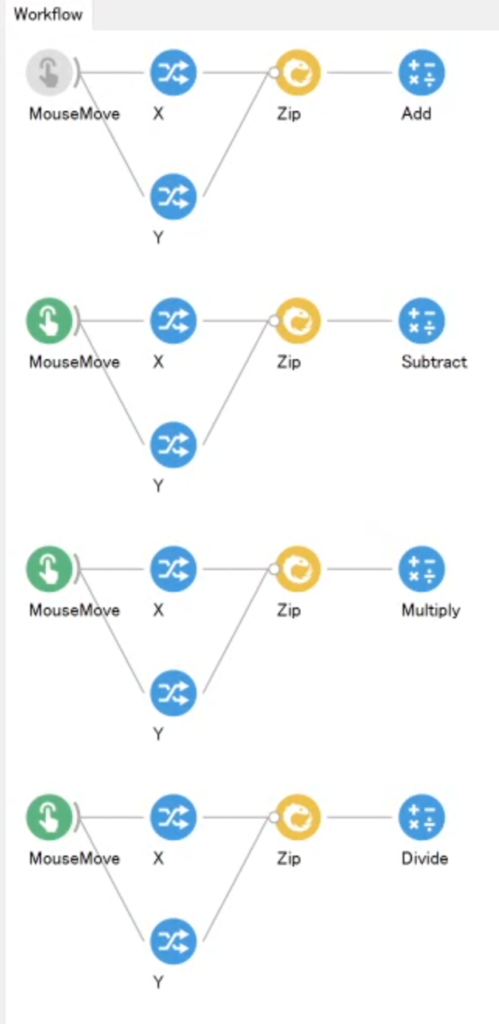
    Below are the arithmetic operations in action: from top to bottom, addition, subtraction, multiplication, and division.

    For clarity, I used the X and Y values from MouseMove as an example here.
    In practice, though, you can perform calculations on values obtained from other sensors and the like.

    The key point in Bonsai is that you need to combine the two values with “Zip” before performing the operation.

    The contents of “Zip” take the form (value 1, value 2); its role is to bundle the two values at that moment into one.
    Each operation then computes value 1 and value 2 together.

    It is hard to explain in words, so try to get a rough intuition for it.
    Without “Zip”, the program would not know which value to multiply with which, so the calculation could not be performed. That is why the X and Y values must first be combined so that they correspond to each other.

    The names of the operators for each arithmetic operation are listed below.

    • Addition => Add
    • Subtraction => Subtract
    • Multiplication => Multiply
    • Division => Divide

    I have included a demonstration below for your reference.

    <Example in action>

  • SONY or Panasonic for a vlog camera? A thorough comparison

    SONY or Panasonic for a vlog camera? A thorough comparison

    The word “Vlog” has become widely familiar, and it will likely keep spreading.
    Riding that wave, I decided I wanted to try making Vlogs myself, so I made up my mind to buy a new camera.

    One camera currently on the market built specifically for Vlogging is the
    Sony VLOGCAM ZV-1

    Panasonic DC-G100

    .
    Unlike a handheld camcorder, it is relatively compact and can be shot with one hand, and it makes it easy to capture advanced footage such as beautifully blurred backgrounds.

    The two cameras listed above are in almost the same price range, and both have more than enough features for Vlogging.
    Precisely for that reason, it is really hard to decide which one to buy.
    So let me compare the two and list their strengths and weaknesses.

    Sony VLOGCAM ZV-1

    Strong points

    ・A variety of video modes (you can switch instantly between product reviews, scenery, faces, etc.)
    ・Light (about 294 g)
    ・Two color options (the white one is cute…)
    ・Plenty of controls on the tripod grip
    ・Comes with a fluffy mic windscreen
    ・Wide zoom range
    ・Connects to the tripod without a cable, and the tripod buttons work
    ・Simple to operate

    Weak points

    ・Still photography isn’t the focus, so I wouldn’t expect much there
    ・No viewfinder
    ・Apparently it can overheat and shut down

    Panasonic DC-G100

    Strong points

    ・It’s a mirrorless camera, so you can swap lenses
    ・Solid photo features too (a good pick even for someone just getting into photography)
    ・The microphone is amazing!
    ・The screen is beautiful!
    ・The edge of the screen turns red while recording, so it’s easy to tell you’re rolling
    ・It has a viewfinder

    Weak points

    ・Heavier than the Sony
    ・The kit lens barely zooms
    ・There’s a cable between the tripod and the camera

    What defines the Sony VLOGCAM ZV-1:
    it’s easy to operate, so anyone can start Vlogging!
    A camera built purely for Vlogging!

    What defines the Panasonic DC-G100:
    an outstanding microphone for serious video work,
    plus more than enough photo capability

    What both cameras share is a full set of Vlogging features: image stabilization, eye autofocus, smartphone connectivity, 4K recording, and so on.
    Both were designed for people shooting Vlogs, so I don’t think you’d regret either choice.
    It really comes down to what extra capabilities you’re after.

    If you’re committed to Vlogging, or your Vlogs center on people, Sony’s VLOGCAM is a very strong choice.

    If you want to shoot stills as well as video, I’d go with Panasonic’s G100.

    That said, I normally shoot photos with a DSLR, and it’s a Canon, so the lenses aren’t compatible.
    That means with the Panasonic I’d have to buy new lenses whenever I wanted a different angle of view…

    How far can I really push the Panasonic’s photo features?
    That feels like it will be my deciding factor.
    Depending on how it goes, I might just switch from Canon to Panasonic… haha

    After that, all that’s left is to see and handle them in person at the store and go with my gut!

    I hope this is helpful to you all.

    Links
    Sony VLOGCAM ZV-1
    Panasonic DC-G100