This article was automatically translated from Japanese using AI. The Japanese version is the authoritative version.
As a home 3D printer, this is a machine that personally makes me think there may be nothing better.
It is an excellent machine in every respect: cost performance, practicality, and design.
It does have some drawbacks, but even so, considering the price, you have to wonder whether anything could beat it.
Features of the Sermoon D1
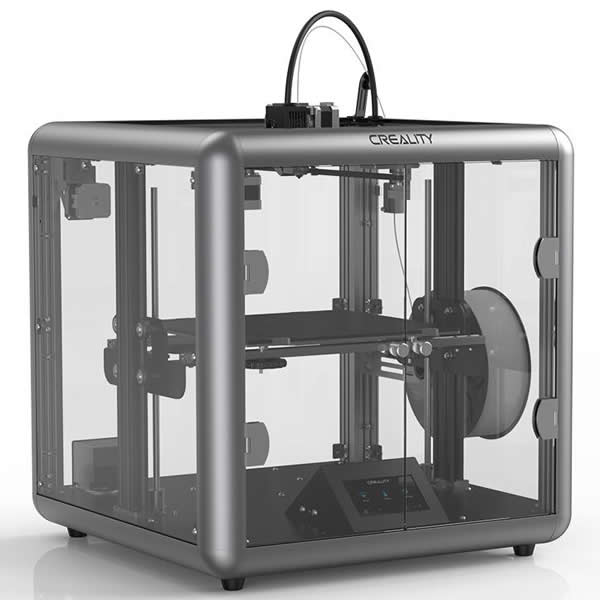
Unusually for a low-priced home model, it is a fully enclosed 3D printer, so heat does not escape easily while printing, making it easier to get clean prints.
And because it is built from an aluminum alloy frame with transparent side panels, you can watch the printing process from every direction.
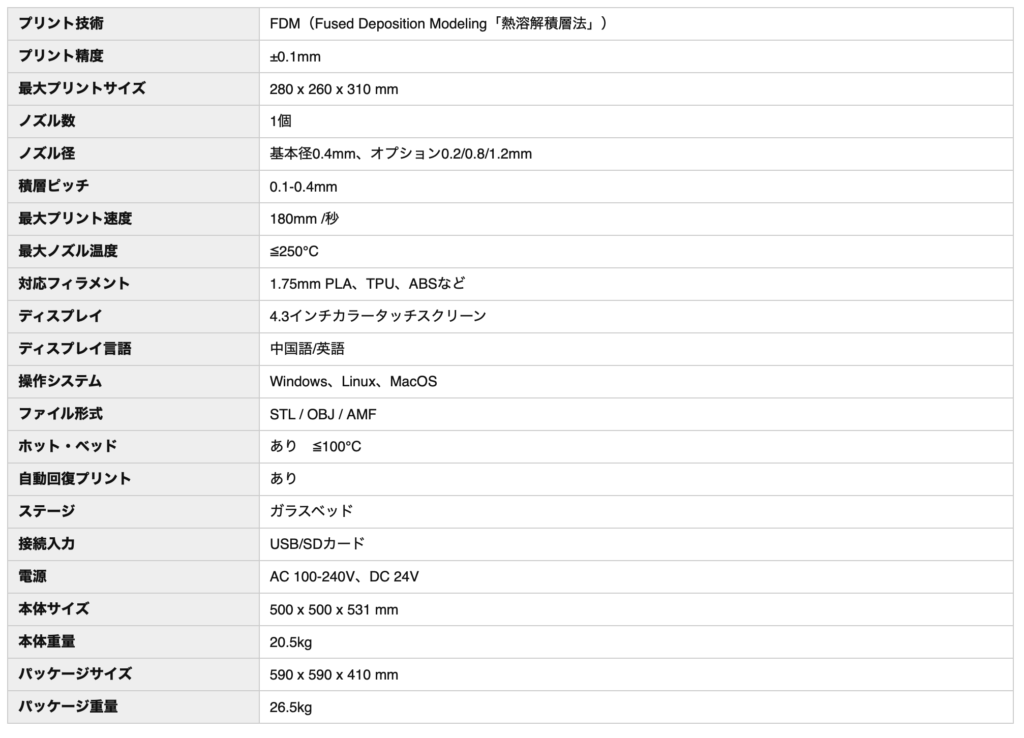
The build volume is a very generous 280 x 260 x 310 mm, which is extremely handy for printing large objects.
It handles PLA and ABS without any problems, of course.
Operation is via a touchscreen and is very easy.
Buying it and using it
The first thing that surprises you after buying it is the size.
When the box arrived and I tried to bring it into the room, it barely fit through the door.
Apparently there are cases where the outer box will not fit through the front door when it arrives at your home.
The printer itself is smaller than the outer box, so you can get it in by taking the contents out, but even so the size is overwhelming.
The unit measures about 500 x 500 x 531 mm, so you need a fair amount of space to place it in a room.
This too comes down to it being fully enclosed: the build volume is 280 x 260 x 310 mm, but the width is nearly twice that.
Assembly after delivery was very easy—just attaching two parts.
I think the greatest feature of this model is how quiet it is.
Even with the fan running at 100%, it is remarkably quiet.
Sleeping right next to it at night is admittedly not feasible, but taking a nap is no problem at all, and if you are on the phone beside it, the printer is barely audible.
Even when you print with a raft, the raft comes off easily.
And depending on the object, you can print beautifully without a raft at all.
During printing the bed is warm so the print sticks to it, but once printing finishes the bed cools down, so the print is easy to remove.
The bed is made of some curious material, and having prints come off it so easily after printing is genuinely fun.
Recommended settings
The default settings already print cleanly enough, but I tuned the settings myself to get even better prints, and here I share the configuration that worked well for me.
https://drive.google.com/file/d/1ZBnrYzihwzA0iWwKvfA8w2feE9WD4-Wn/view?usp=sharing
These are settings for Creality Slicer.
Basically, you set the infill (how densely the interior is filled) however you like.
I use 15%.
I lowered the retraction speed—the speed at which the filament is pulled back—and slowed the print speed.
I raised the head travel speed as high as I could while still getting properly formed prints.
Once you understand what each parameter means and what values it takes, you can customize things yourself to a fair degree.
Keep in mind that what I present here is just one example, and since other people’s recommended settings did not work all that well for me, please treat it as a reference for finding settings that suit your own setup.
Drawbacks
Being a home model, it does have a few drawbacks.
– It has no auto-leveling, so getting a feel for leveling at first is difficult for beginners.
– Changing the filament is difficult (is this true of all printers?).
– There are few reviews, so there was not much to refer to when I wanted to tweak the settings.
– You have to put your data on an SD card, so sending data over Wi-Fi and the like is not possible.
Among home models it is very easy to use, and I can recommend it to beginners and advanced users alike.
If you are thinking about getting a 3D printer, definitely give it a try.