Author: 山ノ内 勇斗

  • Side Effects of COVID-19 Vaccines: A Science Student’s Careful Review of the Evidence — Based on Japan’s Ministry of Health, Labour and Welfare Website

    Side Effects of COVID-19 Vaccines: A Science Student’s Careful Review of the Evidence — Based on Japan’s Ministry of Health, Labour and Welfare Website

    With misinformation circulating about the side effects of COVID-19 vaccines, and media coverage that often stokes anxiety, it can be hard to know which information to trust.

    The most reliable source of COVID-19 vaccine information in Japan is, I believe, the content posted on the Ministry of Health, Labour and Welfare (MHLW) website.
    However, materials such as the health status surveys are quite difficult to follow, so few people are likely to read them.

    The MHLW’s Q&A on COVID-19 vaccines is written very clearly, so I will quote from it here.

    Vaccine basics

    First, two COVID-19 vaccines are currently being administered in Japan: the Pfizer vaccine and the Moderna vaccine.

    Both are mRNA vaccines that work through essentially the same mechanism, and their efficacy in preventing symptomatic COVID-19 is nearly identical: about 95% for Pfizer and about 94% for Moderna.

    Both are given as intramuscular injections.
    Intramuscular injection may look painful because the needle goes in fairly deep, but in practice most people I know said it hurt about the same as a subcutaneous injection such as a flu shot, or even less.

    There are some other minor differences, but fundamentally both offer comparable efficacy, and current data indicate that neither is superior to the other.

    Main side effects of the vaccines

    Side effects that may occur with both the Pfizer and Moderna vaccines include fever, headache, joint and muscle pain, pain at the injection site, fatigue, and chills.
    Injection-site pain more often appears the day after vaccination than immediately afterward, and side effects can be somewhat delayed, so take good care of yourself on the day after your shot.

    In rare cases, serious reactions such as shock or anaphylaxis (a severe allergic reaction) may occur.
    Very rarely, mild myocarditis and pericarditis have been reported after vaccination.

    If a health problem arises from side effects after vaccination, you may be able to use the Relief System for Injury to Health with Vaccination; contact your local municipality for details.

    A common side effect of the Moderna vaccine is what is popularly known as “Moderna arm.”
    This refers to pain and swelling at the injection site appearing about a week after vaccination.

    In general, side effects subside within a day to a few days.

    Side effects are also said to be more likely after the second dose than after the first.

    Health survey reported by the MHLW (as of July 7)

    The link to the health survey is here

    Pfizer vaccine

    Please see the link for the detailed data.
    Here I will give a rough summary of what the data show.

    As for local reactions at the injection site, the proportion of people with redness or swelling did not differ greatly between the first and second doses, at roughly 10–12%.

    However, about 90% of people reported pain at the injection site after both the first and second doses, so nearly everyone experiences some pain.
    The proportion reporting a sensation of heat at the injection site was about 10% after the first dose and about 16% after the second.

    These symptoms peak on the day after vaccination, and the proportion affected roughly halves on day 3 and again on day 4.

    Regarding systemic reactions, fever above 37.5°C occurred in under 10% of people after the first dose, compared with about 40% after the second.
    Fever was more common in younger people (about 50% among those in their 20s), and roughly 5 percentage points more common in women than in men.

    Fever peaks on day 2, but by day 3 the proportion affected drops to about one-quarter or less, and by day 4 it has resolved in nearly everyone—so it clears up quickly for most people.

    General fatigue occurred in about 25% of people after the first dose and about 70% after the second, while headache occurred in about 20% after the first dose and about 55% after the second. As with fever, the trend is that younger people are more likely to experience these symptoms, and women more so than men.

    The Moderna vaccine

    The rates of side effects for the Moderna vaccine were largely the same as for Pfizer, as were the symptoms themselves.

    As for “Moderna arm,” which is characteristic of the Moderna vaccine, it occurs in about 5% of people after the first dose.
    Five percent may sound rare, but it works out to one in twenty people, so most of us probably know one or two people who have experienced it.

    Summary

    I have covered a lot of ground on the rates of side effects, so let me summarize here.

    • Almost everyone experiences pain at the injection site
    • Local symptoms such as pain, redness, and swelling at the injection site occur at roughly the same rate after the first and second doses
    • Systemic reactions occur more often after the second dose than the first
    • Fever and fatigue can occur in many people
    • Side effects are more common in younger people, and more common in women than in men
    • Side effects peak the day after vaccination, and for most people symptoms subside within one to three days

    A great deal of media coverage is framed in ways that stoke anxiety.
    By looking at the actual data with your own eyes, you can get a clearer sense of what the concerns about COVID-19 vaccines really amount to.

    I hope this article is helpful to you.

  • PC or PS5 for Gaming?

    PC or PS5 for Gaming?

    When you decide to play APEX, Call of Duty, or other big-name titles, you’ll probably wonder whether to play on a PC or buy a PlayStation 5.
    As someone who owns both, I’d like to walk through the advantages of each and who I’d recommend them to.

    About gaming PCs

    Who they suit
    ・People who want to do plenty of things besides gaming
    ・People who plan to stream their gameplay
    ・People who can spend a fair amount of money

    The biggest advantage of a gaming PC is, without a doubt, that you can customize it to your own taste.
    You can pick your own parts and build it yourself, or you can buy a pre-built machine from a shop like Dospara.

    The more you spend, the higher-performance a PC you can build.
    If you want to game in 4K, expect to pay at least around 200,000 yen for a full setup.
    That works out to roughly 150,000 yen for the PC itself, plus about 50,000 yen for accessories like a display and mouse.

    It costs money, but you can add lighting, fuss over your peripherals, and really express your own style.
    Choosing a PC also requires a certain amount of knowledge, so you’ll deepen your understanding of computers along the way.

    Speaking from experience, the knowledge I picked up while building my own PC has come in handy in all sorts of situations—I can do a quick diagnosis when a friend’s PC acts up, and I can handle maintenance on my own machine myself.

    Also, since it’s a computer at heart, you can do things other than gaming.
    In particular, programming requires a machine with reasonably good specs, and a gaming PC easily clears that bar.

    Some people may worry about game availability, but you can generally buy games on a site called Steam.
    Most of the well-known titles sold on the PlayStation Store are also available on Steam.
    So there’s not much to worry about.
    If anything, you can also play PC-exclusive games, which greatly widens your options.

    Next, about the PS5 (home game consoles)

    Recommended for
    ・People who aren’t comfortable with computers or electronics
    ・People who just want to play games
    ・People who don’t want to spend that much
    ・People who want to play with friends

    Here I’ll use the PS5 as my example.
    PlayStation has a friends feature, which makes it extremely easy to play games while chatting over voice.
    Because it’s a dedicated gaming machine, these gaming-oriented features are very easy to use.

    By buying games on disc, you can sell them at a used shop like Book Off once you stop playing, which saves you money overall.

    The console is also smaller than a PC, and a single unit draws less power than a PC. (PCs consume about as much electricity as a hair dryer at this point.)

    It doesn’t get brought up much, but the thing I personally liked best was how the controller feels to use.

    You can use a PS5 controller on a PC too, but problems come up easily—you have to remap buttons, and connecting wirelessly introduces lag, so I ended up using a wired connection. On the PS5, I barely noticed any lag even over a wireless connection.
    You might think that goes without saying, though.

    Precisely because it’s a dedicated gaming machine, it’s inexpensive, yet its gaming performance is on par with a PC costing around 300,000 yen—I honestly have no idea how they pull it off.
    The PS5 is built to unbelievably high specs.

    This has only been a small slice of the comparison, but I hope it helps you see which one is right for you.
    Personally, I think deciding based on your purpose—whether you just want to game or want to do other things too—leads to the decision you’ll feel best about.

  • I bought an electric air duster. Seriously, it’s amazing

    Air dusters come in handy in all sorts of situations—working on a computer, tinkering with junk parts, messing with electronic circuits, and more.
    The problem is that a single can is surprisingly expensive and runs out almost immediately.
    On top of that, disposing of the cans is a hassle.

    So while air dusters are highly versatile, they also come with plenty of drawbacks.
    My can had just run out, and while shopping online for a replacement, I came across an electric air duster.

    Being electric, I was skeptical about whether it could match the power of a canned air duster and whether it would really be practical.
    The reviews were fairly good, though, with many comments saying it was stronger than expected.

    It was about 7,000 yen, so I decided to just go ahead and buy one.

    It’s the Sanwa Supply electric air duster.

    The first thing that surprised me when I used it was just how strong the air pressure is—more than enough.
    It has enough force to blow an ordinary sheet of paper away, which is more than sufficient for clearing dust off a computer.

    The battery lasts a long time, and unlike a canned duster, it never gets cold and loses power when you keep it running.

    The unit charges via USB Type-C, and a cable is included.
    These days a Type-C cable is surprisingly useful to have around, so that’s a nice bonus.

    One drawback is that the response is a bit slow.
    After you press the switch, it ramps up over about a second, and it takes one or two seconds to reach full power.
    You end up going “hmm, hmmm…” while you wait.

    I’ve uploaded a video so you can see the power and the response for yourself.

    https://youtu.be/Nu6S6vfROhg

    For me, the slow response isn’t stressful at all, and there’s no situation where I’d need faster response, so
    this turned out to be a purchase I’m glad I made.

    Now I can say goodbye to disposing of cans, and I no longer have to worry about the cost of air dusters.
    I’d definitely recommend picking one up.

  • A Visit to the Starbucks at Toyota Kuragaike Park

    A new Starbucks recently opened at Kuragaike Park in Toyota City.
    Kuragaike Park is a large park with attractions like a free zoo, and on weekends families with children come to play there.

    It has grassy open areas, so you can have a picnic or get some light exercise.
    Since a Starbucks had opened in that very Kuragaike Park, I simply had to go — so I went.

    The Kuragaike Park Starbucks faces the pond, with terrace seating on the pond side, and outside that there are steps leading down.

    Inside there are also various types of seating — sofas, tables for two, a large communal table — so it works for all sorts of purposes.

    On nice days you can enjoy your Starbucks outdoors, on the terrace, on the steps facing the pond, or out on the grassy lawn. It’s a Starbucks that feels at one with nature.

    Conversely, the indoor space is also well suited to studying a bit, reading a book, or just spending time relaxing.

    Kuragaike Park is a large park well known as a place for children to play, so there is often a line on holidays.
    When I went it was around midday on a Saturday, and the line stretched out the door.

    Even though it takes a while before you get your drink, the store is relatively spacious and there is outdoor seating too, so even when people are lined up you can still find a few open seats inside.
    The turnover is also good ♪
    It’s really nice not to have to worry about buying a drink and then having nowhere to sit and enjoy it.

    The last time I went it was an extremely sunny day, and I read a book out on the terrace.
    That said, it was so bright that my eyes started to hurt, so indoors may be better for reading or studying.

    My biggest concern is that Aichi Prefecture gets extremely hot — outdoor temperatures top 40 °C in summer.
    So once summer really sets in, a lot of people may come inside just to cool off.

    The Kuragaike Park Starbucks is a wonderful Starbucks that blends right into its natural surroundings.
    Definitely give it a visit.

  • I Went to the Banksy Exhibition in Nagoya

    I Went to the Banksy Exhibition in Nagoya

    I went to see “The Art of Banksy: Genius or Vandal?”
    The exhibition runs in Nagoya from February 3 to June 20, and in Fukuoka from July 2 to October 31.

    The exhibition’s website is here

    Banksy is an anonymous artist based in the UK, and works attributed to Banksy can be found scattered all over the world.

    I didn’t know much about Banksy, but when I learned that he was a street artist who paints satirical images symbolizing criticism of society all over the world, I became curious about what kind of person he is and what kind of work he makes, so I went to see the exhibition.

    Photography was allowed for every work in the exhibition, and everyone who came to see it was taking pictures with their smartphones.

    This time, in order to see Banksy’s works themselves without preconceptions, I decided to look at the works as directly as possible, avoiding the explanatory texts.

    Having seen it all the way through, my impression is that, if I had to answer the exhibition’s question, Banksy is both a genius and a vandal.
    That said, while I agree that Banksy is a genius, the label of “vandal” felt a little off to me.

    This is just my personal take, but Banksy seems to feel a kind of sadness toward society and the world.
    People have lost sight of what it means to be human, and are tossed about by the world and swallowed up by consumer society.
    The strong fail to notice the weak, widening the gap even further.
    And he seems angry that people never question the things they take for granted.

    That’s the impression I got.
    Because he is a genius, he has come to see the true nature of the world.
    But since he couldn’t change the world even by becoming a politician, he appeals to the world as an artist instead.

    Since I know almost nothing about Banksy, I have no idea whether this reading is right.
    I may be completely off the mark.

    Still, while I felt a strong will in the works, I didn’t sense the violent side that the word “vandal” implies. What came through was sadness and Banksy’s own strong conviction—and perhaps to conceal that, or perhaps out of humor, it is expressed in the form of satirical images.

    Honestly, for nearly half of the works I had no idea what they were trying to say.
    But with the other half, something came through to me naturally.

    It is precisely because Banksy is a genius that he can create critical satirical images with humor.
    I also thought his technical skill as a painter was outstanding.

    I myself have things I want to criticize about society and things I want to speak out about, and perhaps those feelings overlapped with Banksy’s works and led me to interpret them this way.

    I think anyone who looks at Banksy’s work will feel something.
    I’m very curious how Banksy’s works look through your eyes.

  • Trouble with a Mercari Transaction: A Third Solution — the Partial Refund

    Trouble with a Mercari Transaction: A Third Solution — the Partial Refund

    Trouble is almost inevitable when buying and selling on Mercari.
    I’ve done over 100 transactions myself, and the other day I ran into my first real problem.

    What I bought was a coffee machine, and some of its functions didn’t work.
    When I contacted the seller, they said they had checked that it worked properly before listing it and had had no problems using it.

    Mercari’s FAQ has an entry titled “The item I received is different from the description / is broken.”
    However, it basically says that the seller and buyer should discuss the matter between themselves, and for returns it describes agreeing on who pays the return shipping and then cancelling the transaction.

    In other words, the transaction guide makes it feel like your only options are to return the broken item or accept it as is.

    Depending on the item, though, only some functions may be broken while everything else works fine.
    And if those functions aren’t that important to you,
    there are times when you’d rather not pay full price but would be happy with a discount.

    In that case, you can arrange a partial refund.
    You can’t do it unilaterally, but if you reach an agreement with the other party you can contact Mercari’s support office.

    In my own case, I proposed a partial refund and sent an inquiry to the support office.
    They replied that the buyer and seller should decide the refund amount between themselves and then contact them again through the inquiry form with that amount.

    Once we agreed and settled on a refund amount, I reported it, the partial refund went through without a hitch, and the transaction was completed.

    The support office responded very quickly—from the time I told them I wanted to arrange a partial refund, it took only about a day to decide the amount and receive the refund.

    Problems on Mercari can happen no matter how careful you are.

    When something goes wrong in a transaction on Mercari, you have to negotiate with the other party and settle it there; the lack of a fixed protocol or procedure on Mercari’s side was quite confusing at first.
    In my case the other party was very reliable, so resolving the issue went very smoothly.

    Apparently, if you can’t get in touch with the other party, you can also have the transaction forcibly closed by contacting Mercari’s support office.

    Incidentally, for the coffee machine I bought, I was refunded about 40% of the purchase price.
    But after the transaction closed, I took it apart to see if I could fix it and found a water leak, so I decided it was dangerous to use and threw it away.

    In hindsight, maybe I should have just returned it…

  • Extracting Specific Values from a DataFrame [Python]

    Extracting Specific Values from a DataFrame [Python]

    Extracting one specific value from a pandas DataFrame in Python is surprisingly tricky.
    DataFrames are designed to be handled as DataFrames, so extracting, slicing, or appending rows is very easy.

    When you try to pull out a single value, however, for some reason you don’t get the value itself—you end up with a DataFrame, along with various other issues.

    Here I describe how to extract the value in a DataFrame that satisfies a particular condition.
    There may well be better approaches, but this is the best I can do at the moment.

    Suppose we have the DataFrame below and want to extract the value 20 outlined in red.

    The problem is that with a simple DataFrame like the one above you can see the index and pull the value out in one step, but with a large dataset it is very hard to check the index number and use it.

    With large amounts of data, it is more efficient to extract values using a key column (customer number, id, etc.) as a clue.
    So let’s try extracting the value in the situation below.

    In other words, we want to extract the value in column B for the row where column A is Aichi.
    This cannot be done in a single step; the value is extracted in two stages.

    First, create a DataFrame like the one above.

    import pandas as pd
    df = pd.DataFrame({ 'A' : ["Tokyo", "Aichi", "Osaka"],
                        'B' : [10, 20, 30],
                        'C' : [100, 200, 300]})
    df

    Next, extract the row where column A is Aichi.

    a = df[df["A"] == "Aichi"]
    
    print(a)

    This lets us extract the row containing Aichi.
    Finally, extract the value in column B of that row.

    b = a.at[a.index[0], "B"]
    
    print(b)

    Doing this, we can extract the value.
    It is roundabout, but this is the method I currently use.

    If you know of another approach, I would be glad to hear about it in the comments.

    import pandas as pd
    df = pd.DataFrame({ 'A' : ["Tokyo", "Aichi", "Osaka"],
                        'B' : [10, 20, 30],
                        'C' : [100, 200, 300]})
    
    a = df[df["A"] == "Aichi"]
    b = a.at[a.index[0], "B"]
    print(b)

    Here is a summary of the program above.

  • try and except: Exception Handling in Python

    try and except: Exception Handling in Python

    Errors sometimes come up when you are writing a program in Python.
    Errors are actually helpful, since they tell you that your program has not been put together correctly,
    but sometimes an error will stop your program from running altogether.

    Sometimes code that is syntactically correct still raises an error at runtime.
    An error raised when the syntax is grammatically incorrect is called a syntax error,
    while an error that is grammatically correct but logically wrong is called an exception.

    Some examples of exceptions:
    TypeError: the operands are of incompatible types
    EX. word/2 , 4*number

    ZeroDivisionError: division by zero
    EX. 3/0

    ValueError: the type is correct but the value is not appropriate
    EX. int(“string”)

    You can use conditional branching to head off errors before they happen and write a logically correct program, but you can also take the approach of handling the exception when an error does occur.

    That is where try, except comes in.

    try: 
        実行したい処理(例外を含むかもしれない)
    except エラー名:
        例外発生時に行う処理

    You use it like this.
    For example,

    try:
        print(10 / 0)
    except ZeroDivisionError:
        print('できませんでした')
    #出力
    できませんでした

    That is the result.
    Note, however, that except only catches the error you specify
    (in this program, only ZeroDivisionError), so if any other error occurs it will still be reported as an error when the program runs.

    When you expect more than one kind of error, add another “except ErrorName:” clause.

    try:
        print(10 / 0)
    except ZeroDivisionError:
        print('できませんでした')
    except ValueError:
        print('値がうまく合致しませんでした')

    You can specify multiple except clauses.

    If you leave out the exception name entirely in the except clause, you can catch every exception.

    try:
        print(10 / 0)
    except:
        print('できませんでした')

    Be very careful with this, though: because it catches every exception, it will also hide errors the programmer never anticipated.

    There are also keywords related to the try-except syntax that let you specify what happens after an exception occurs.
    I will list them briefly here.
    I plan to cover them in detail in another blog post.

    • raise: deliberately raise an exception
    • pass: do nothing after the exception occurs
    • else: run only if no exception occurred
    • finally: always run, whether or not an exception occurred

  • What is the IT Passport Examination? How long does it take to study? What is it good for?

    What is the IT Passport Examination? How long does it take to study? What is it good for?

    I recently took the IT Passport Examination.
    The IT Passport Examination has been gaining recognition lately, but what kind of certification is it, and how difficult is it?
    I’ll explain based on my own experience.

    First, to summarize:
    The IT Passport Examination is a proficiency test covering knowledge of IT.
    Study time is roughly 30 hours. Even at the very least, you’ll need more than 10 hours!

    To begin with, the IT Passport is a national certification, and it is a credential showing that you have basic knowledge of IT and business management in general.

    So it isn’t a license; to me it felt closer to a proficiency test.
    The content, too, is less about programming and more about IT technology plus general knowledge related to corporate strategy and management.

    The benefits of earning this certification include:
    ・It gives you a selling point in your job search
    ・It serves as proof that you have IT knowledge

    The people I’d recommend it to are mainly university students and new employees.
    If you’re feeling uneasy about job hunting, why not give this certification a try?

    Next, about the exam itself.
    Having taken it, I felt the difficulty was about the same as when I got my Class 4 amateur radio license.
    Frankly speaking, it was harder than I expected.

    I think about 30 hours of study will reliably get you a pass.
    In my case it was around 8 hours, and it felt like a squeaked-by pass.

    The content is relatively easy to grasp and many of the topics are familiar, but the actual terminology is very hard to memorize—there are tons of three-letter acronyms and complicated terms.

    As for the fastest way to pass, the key point is that you must not try to get a perfect score.
    Aim for just a bit above the passing score of 600 (out of 1000).

    The reason is that the exam will definitely include questions on things you haven’t studied.
    There are also plenty of questions that are hard to understand.

    Past exams are published on the official website, so if you work through the last few years’ worth you’ll see what I mean—there’s a surprising amount of “I never studied this!” and “This is way too hard!”

    When you hit a question you don’t understand, many people want to fully understand it or be able to solve it, but if you want to pass in the shortest time, just accept that it is what it is and move on.

    The acronyms are hard to remember too, but rather than memorizing every term perfectly like a dictionary, narrow it down to keywords and aim for a rough, general grasp.

    Some might question whether that’s good enough for a certification, but personally I don’t think you need to memorize terms like a dictionary at all.
    What matters is that when you actually encounter the term, you have a rough sense of what it means and know that such a concept exists.

    Learn it roughly! That’s the fastest route to passing.

    Here’s the study method I’d recommend:

    • Read a study guide once from start to finish (read to the end even if you don’t understand it)
    • Work through past exams from about four years ago up to the present
    • Use the study guide to understand the questions you got wrong or didn’t understand (if it’s not in the guide, let it go)
    • Note down the terms you often got wrong along with their meanings, and reread them right before the exam

    The way to beat this exam is to work through past papers!
    That’s all there is to it.

    It isn’t a highly difficult certification.
    If you prepare properly, you can definitely pass.

    Give it a try!

    The IT Passport website is here
    And here’s the book I used to study

  • Arithmetic Operations in Bonsai

    Arithmetic Operations in Bonsai

    Bonsai is widely used for designing experiments in neuroscience and beyond.
    With Bonsai you can build sophisticated programs without writing code, and run them with precise synchronization.

    Because it is so simple, however, operations that would be trivial in ordinary programming—such as basic arithmetic—have to be done in a somewhat unintuitive way.
    Here I explain how to perform arithmetic operations, using MouseMove as an example.

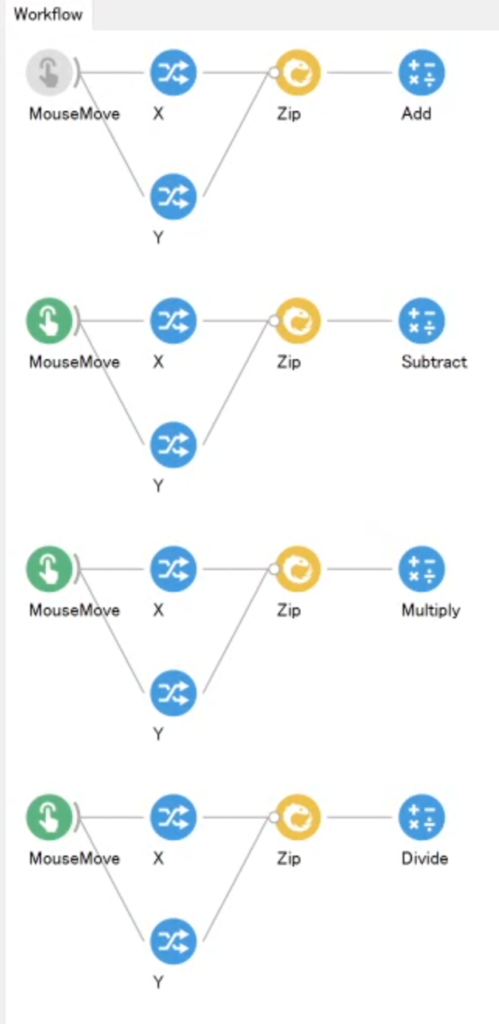
    Below are the arithmetic operations in action: from top to bottom, addition, subtraction, multiplication, and division.

    For clarity, I used the X and Y values from MouseMove as an example here.
    In practice, though, you can perform calculations on values obtained from other sensors and the like.

    The key point in Bonsai is that you need to combine the two values with “Zip” before performing the operation.

    The contents of “Zip” take the form (value 1, value 2); its role is to bundle the two values at that moment into one.
    Each operation then computes value 1 and value 2 together.

    It is hard to explain in words, so try to get a rough intuition for it.
    Without “Zip”, the program would not know which value to multiply with which, so the calculation could not be performed. That is why the X and Y values must first be combined so that they correspond to each other.

    The names of the operators for each arithmetic operation are listed below.

    • Addition => Add
    • Subtraction => Subtract
    • Multiplication => Multiply
    • Division => Divide

    I have included a demonstration below for your reference.

    <Example in action>